|
Hi ,
How are you
doing?
If you really want to get better at DAX, you cannot avoid CALCULATE(). The problem is, most people start using it long before they really understand how it behaves. And that’s why it often feels confusing. In this week’s video, I break CALCULATE down using 5 practical examples. We look at how it behaves with simple filters, how it handles dates, how filters can be layered, how relationships can be switched, and where context transition comes in. If you’ve been using CALCULATE but still don’t feel fully comfortable with it, I am sure this video will help.
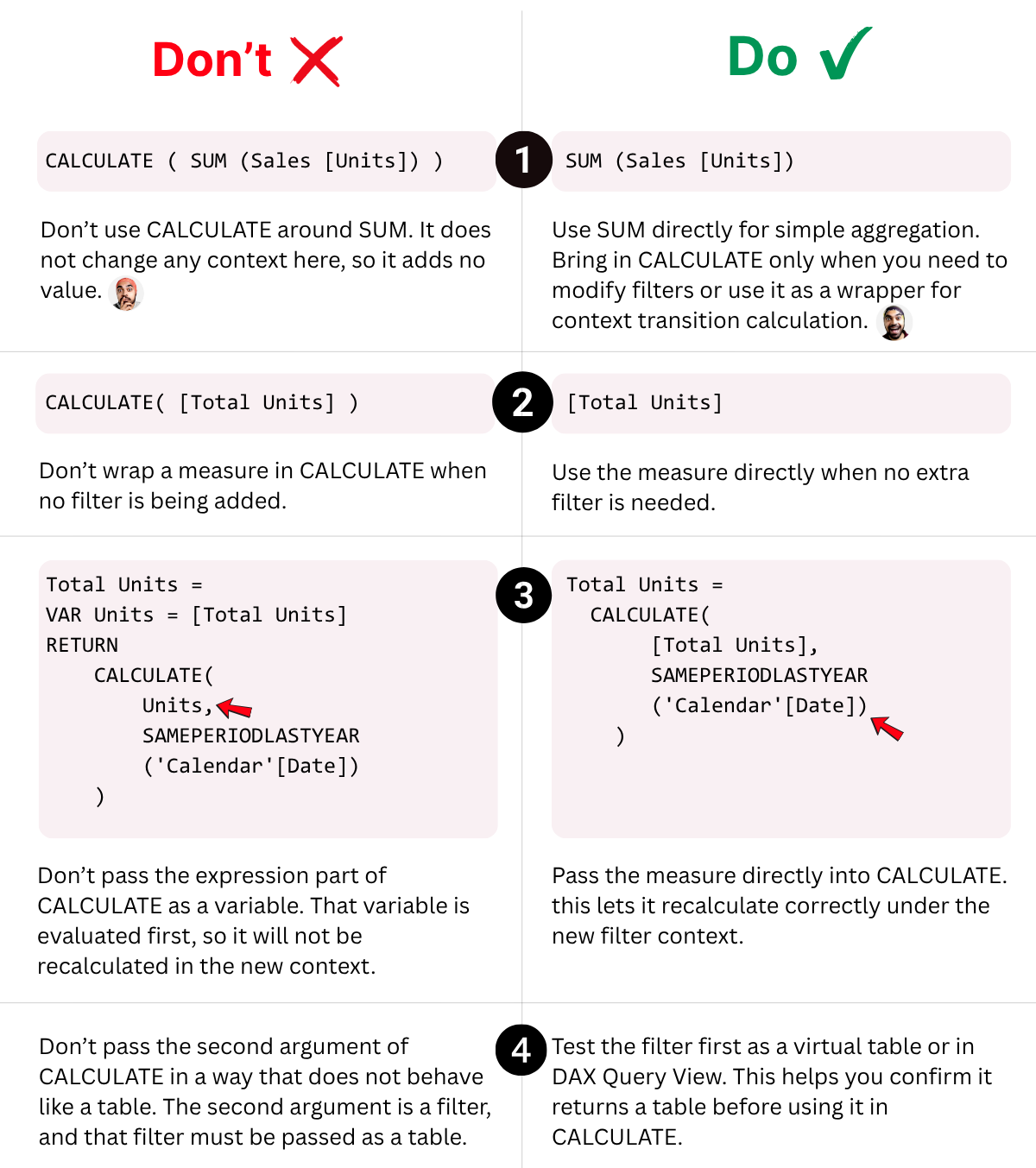
4 CALCULATE Mistakes I See All the Time
The real challenge with
CALCULATE is not just learning the syntax.
And because these mistakes
often do not throw errors, many people do not even realise that something is
off.
Here are 4 common ones I keep seeing, and what to do instead.
2 Ways to Write CALCULATE() in Power BI
Most people learn CALCULATE one way. Both give you the same result… but the way you write it can change how you think about filters in DAX.
Both ways work, but I would still recommend the original CALCULATE()
syntax. |