
|



Are your AI investments paying off? (Sponsored)
 |
AI budgets are under the microscope and most engineering teams only cite time savings from code generation when asked if it’s working.
The real impact is in production, where teams spend 70% of engineering time investigating incidents, jumping between tools, and losing time that could go toward shipping product.
That operational load only grows with every line of AI-generated code that hits prod.
Learn how engineering teams at Coinbase, Zscaler, and Salesforce are seeing AI impact across the full engineering lifecycle. Plus, get a practical worksheet for modeling AI ROI with your own operational data.
Turning a design into working code is one of the most common tasks in frontend development, and one of the hardest to automate. The design lives in Figma. The code lives in a repository. Bridging the two has traditionally required a developer to manually interpret layouts, colors, spacing, and component structure from a visual reference. AI coding agents promise to close that gap, but the naive approaches fall short in important ways.
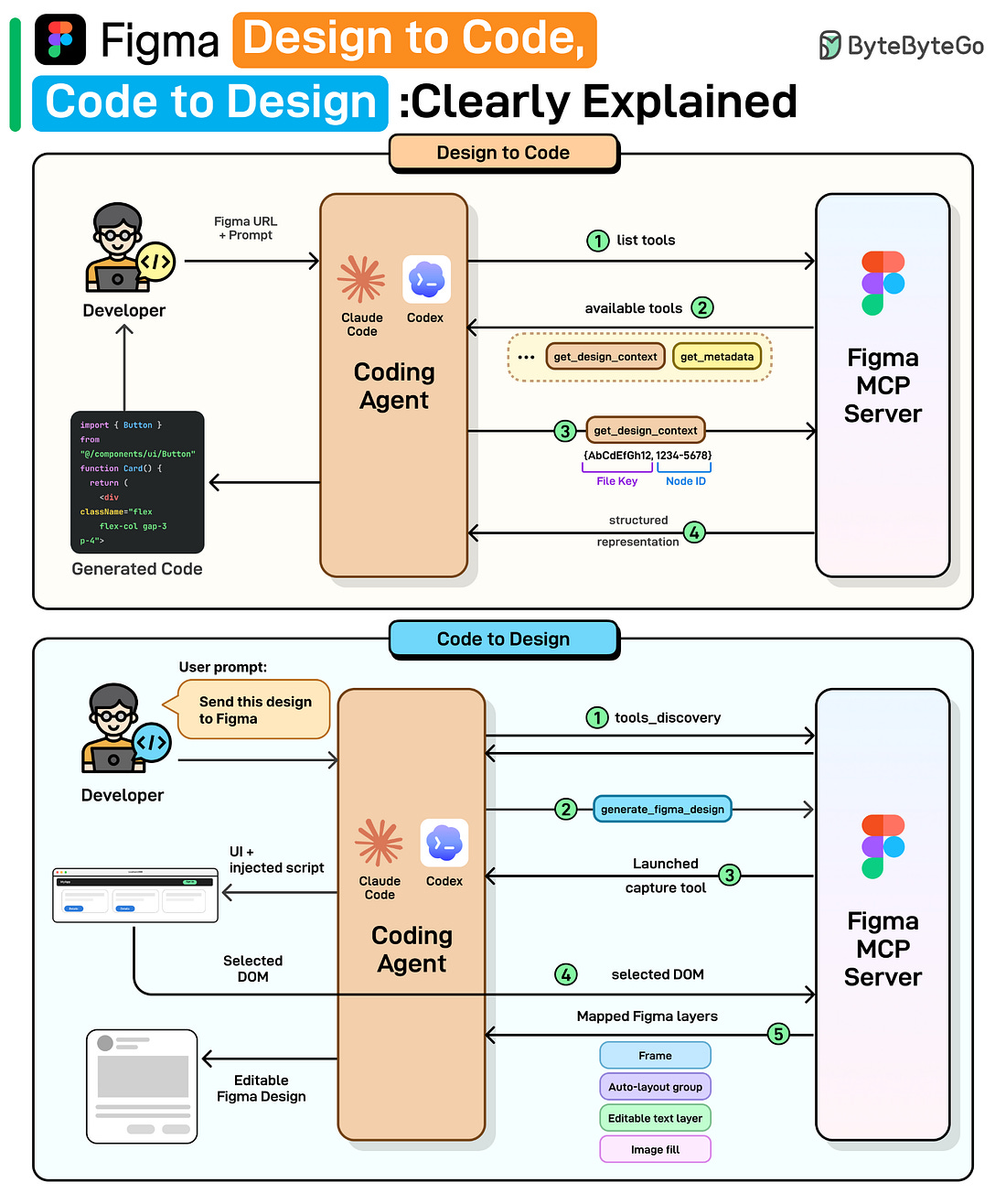
Figma launched its MCP server in June 2025 to bring design context into code. This year, they released two new workflows: the ability to generate designs from coding tools like Claude Code and Codex, and the ability for agents to write directly to Figma design.
We spoke with Emil Sjölander, Aditya Muttur, and Shannon Toliver from the Figma team behind these releases to understand the details and engineering challenges. This article covers how Figma’s design-to-code and code-to-design workflows actually work, starting with why the obvious approaches fail, how MCP solves them, and the engineering challenges that remain.
 |
The Gap Between Design and Code
Before diving into how Figma’s MCP server works, it helps to understand the approaches that came before it, and why each one hits a wall. There are two natural ways to give an LLM access to a design: show it a picture, or hand it the raw data. Both have fundamental limitations that motivated a different approach.
Approach 1: Screenshot the design
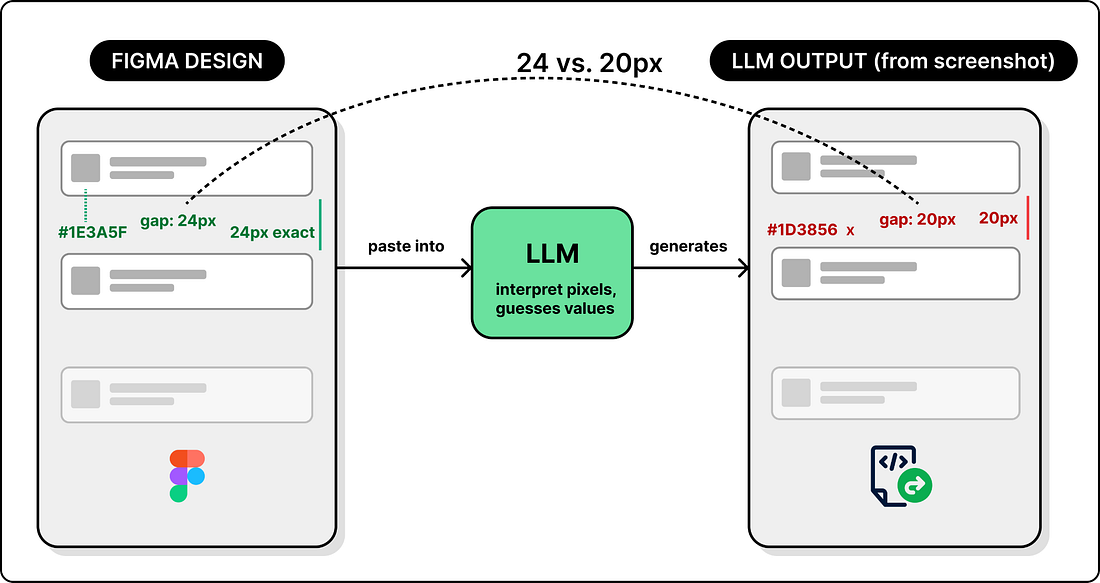
The most obvious way to turn a design into code with an LLM is to take a screenshot of your Figma file and paste it into a coding agent. The LLM sees the image, interprets the layout, and generates code.
This works for simple UIs. But it breaks down for anything complex. The LLM has to guess values based on pixels. It doesn’t know the exact color or that the spacing between cards is 24px, not 20px. The output may look close, but not identical.
 |
So screenshots give the LLM a visual reference but no precise values. The next natural step is to go in the opposite direction: give it all the data.
Approach 2: Get Design JSON via Figma’s API
Figma exposes a REST API that returns a file’s entire structure as JSON. Every node, property, and style is included. Now the LLM has real data instead of pixels.
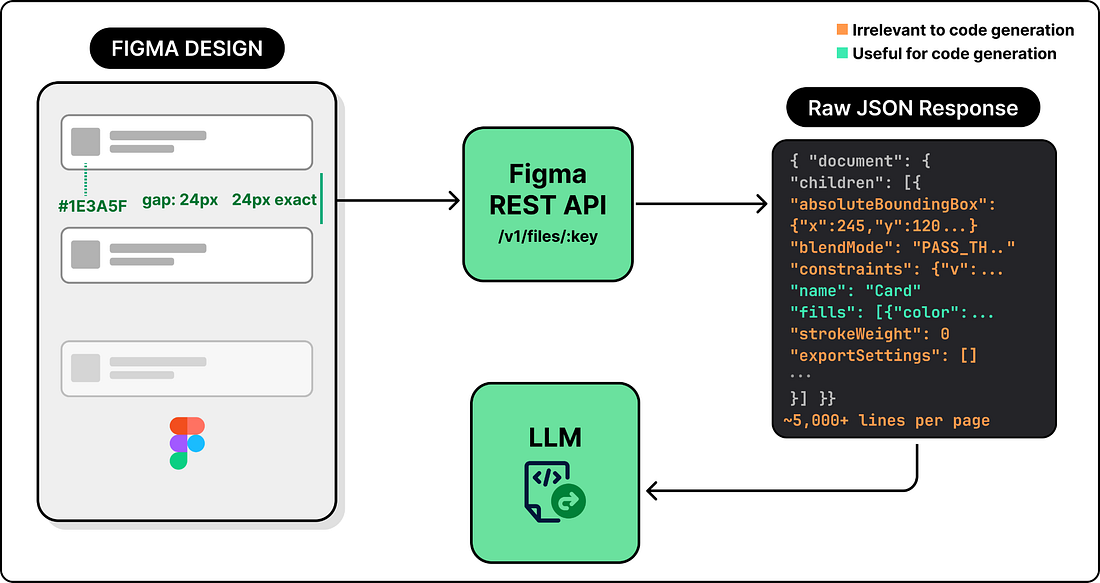 |
But having all the data introduces its own problem: there is far too much of it. A single Figma page can produce thousands of lines of JSON, filled with pixel coordinates, visual effects, internal layout rules, and other metadata that are not useful for code generation. Dumping all of this into a prompt can exceed the context window. Even when it fits, the LLM has to wade through pixel coordinates, blend modes, export settings, and other visual metadata that have nothing to do with building a UI, which degrades the output quality.