|
English | Español | አማርኛ | 中文 | 한국어 | Tiếng Việt | العربية | فارسی | اردو
 |
|
Important Upcoming Events
August 3 - 6 RCMS-101 Grade 7 Jumpstart
August 19 - Carson Virtual Town Hall - 5:30-6:15pm
(A Zoom link will be communicated closer to the event date)
August 20 - Panther Palooza Open House
Last names A-K: 8:30am-10am
Last Names L-Z:10:30am-12:00pm
August 24 - School Begins!
August 31 - Back To School Night 7th Grade - 6pm-7:30pm
September 1 - Back To School Night 8th Grade- 6pm-7:30pm
|
A Message From The Principal
Dear Carson Families,
I hope you are all having a wonderful, relaxing summer and taking time to build special memories with your loved ones!
While the halls are quiet right now, our team here at Rachel Carson Middle School is hard at work preparing for another fantastic school year!
If you have any questions, need assistance, or need to stop by the school to drop off or pick up an item, please note our summer office hours:
-
Summer Hours: Monday – Friday, 9:00 AM – 12:00 PM
Also, please keep these upcoming dates and events in mind as we prepare for the 2026–2027 school year:
-
August 3rd – 4th OR August 5th – 6th: RCMS 101 (7th Grade Jumpstart)
- For students who registered, sessions will run on your selected dates.
-
Wednesday, August 19th (Evening): Virtual Admin Town Hall & Q&A
- Join our administration team virtually for an information session and Q&A. (More details to come!)
-
Thursday, August 20th: Panther Palooza Open House
- Come visit the building, meet staff, and gear up for the new year!
-
Monday, August 24th: First Day of School!
- We officially kick off the 2026–2027 school year.
Thank you for your continued partnership and support. Enjoy the rest of your summer break, stay safe, and take care!
Sincerely,
Principal Washington
Student Schedules Available
Beginning Thursday, August 20 at 6:00 am, all students and parents will have access to class schedules in SIS StudentVUE and ParentVUE. SIS (Student Information System) is the application to see attendance, class performance, and demographic data.
Last Name Families A - K - 8:30am - 10:00am
Last Name Families L - Z - 10:30am - 12:00pm
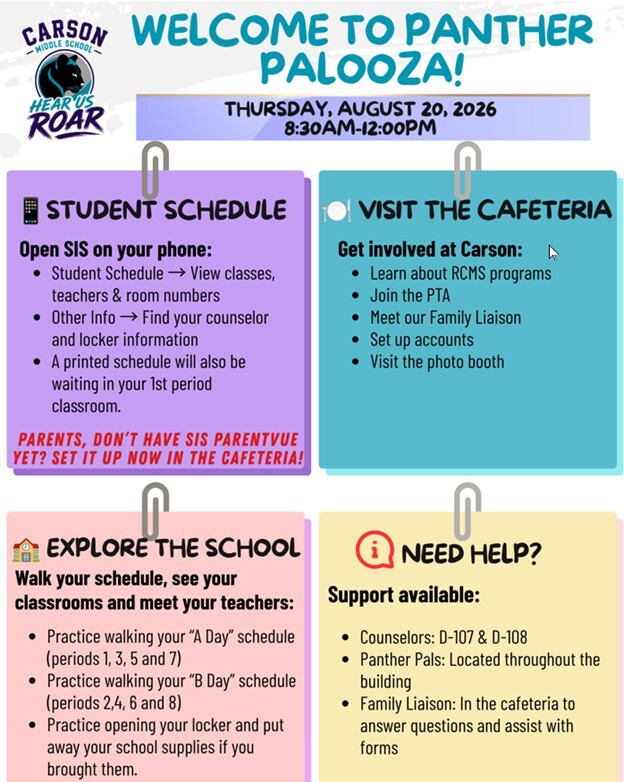
Get ready for the new school year at Carson Middle School! Panther Palooza is your chance to become familiar with the building, pick up important information, and connect with staff before the first day of school.
Student schedules will be available in SIS to open on your phone to view classes, teachers and room numbers. You will be able to find your counselor and locker information and receive a printed copy of your schedule in your first period class.
Parents who don't have a SIS ParentVue account may set it up in the cafeteria and also learn about RCMS programs, join the PTA, meet our school Family Liaison, set up accounts and visit the photo booth.
Families are welcome to explore the building and practice walking their student's A (Periods 1,3,5,7) Day and B (Periods 2,4,6,8) Day schedule and practice opening their lockers.
Our Counselor Team will be available for support in rooms D-107 & D-108.Panther Pals (RCMS students) will be located throughout the building for to point you in the right direction.
ParentVUE Information
Signing up for a SIS ParentVUE account helps you to support your child’s academic success! Caregivers can view important information like attendance, grades, progress reports, and assessment scores through ParentVUE. Once you have activated a ParentVUE account for an FCPS student, you will keep the same account until the student graduates. Information about students in the same family can be accessed through the same ParentVUE account. It is available online and as a mobile app for Apple and Android devices. Need help creating a SIS ParentVue account? This video walks through the steps. Find out more about SIS ParentVUE.
If you already have an account, be sure your contact information is up to date. Parents/guardians can update their phone numbers or email addresses in the Parent/Guardian section. View additional details about ParentVUE.
Activate Your ParentVUE Account to Stay Connected
On Wednesday, July 29, FCPS families who haven't activated their ParentVUE account will receive an email with the subject “Fairfax County Public Schools ParentVUE Activation Letter.” The email will include instructions to activate a ParentVUE account. If you don’t have an account and don’t receive the email, please check your spam folder or submit a request for an activation key through our SIS Parent Assistance Form.
All families are encouraged to activate their accounts as soon as possible to ensure they receive immediate access to important student information and school communications.
New ParentVUE Mobile App Launches July 28
On Tuesday, July 28, a new ParentVUE mobile app became available in the Apple and Google app stores. This new app provides parents and caregivers with a more secure sign-in. The current “classic” app will remain active for about six months. Families must download the new app by December 2026 to ensure they have continued mobile access to their child’s school data.
In the new app, families can enroll in multi-factor authentication (MFA) for FCPS Single Sign-On. While enrollment is optional, we strongly recommend that everyone enable this security feature.
Learn more about installing the new ParentVUE app. Parents needing assistance should submit a Parent Support Request.
Download the FCPS App Today!
The FCPS mobile app offers a customized platform to help keep you connected and informed, directly from your smartphone. Download the FCPS mobile app from the Apple App Store or Google Play Store.
With the app, you can:
-
View school calendars. See events, activities, holidays, and early dismissals.
-
Check school menus. See what’s for lunch and breakfast each school day.
-
Tap to contact. Quickly call attendance lines or email school staff.
-
Stay up to date. Get the latest news from FCPS.
-
Access key links. Jump to ParentVUE, Schoology, and the FCPS website in one tap.
No need to log in, just download and go! Learn more about the FCPS mobile app.
Apply Today for Free and Reduced-Price Meals!
According to the Centers for Disease Control, eating breakfast at school is associated with better attendance rates, fewer missed school days, and better test scores. Studies show that students who eat both school breakfast and lunch tend to have healthier diets than those who don't participate in school meals.
Families who qualify for free or reduced-price school meals can receive breakfast and lunch for their students at no cost or at a reduced cost. This includes more than one-third of FCPS students. Families must complete the Free and Reduced-Price Meals (FRM) application before the start of each school year. Approved applications may also qualify students for additional benefits.
The application for FRM is now available for the 2026-27 school year. Students who were approved for FRM last year are eligible for the first 30 days of school this year (or until a new application is processed). Families should reapply as soon as possible so eligible students continue to receive meals at no cost.
Access the application and view criteria and up-to-date information on the FRM webpage. Families should reach out to their schools with questions or for assistance.
Meals for Students Available Through August 21No-cost meals will be provided to students on a first-come, first-served basis through Friday, August 21, at the sites and times listed on the FCPS |